



Contents
- 1 What Is Hostinger?
- 2 Hostinger Pricing Plans (2026)
- 3 hPanel: Hostinger’s Custom Dashboard
- 4 Performance and Speed
- 5 WordPress Hosting – How Good Is It?
- 6 VPS Hosting: Better Than Most Expect
- 7 Hostinger Website Builder
- 8 Security Features
- 9 Customer Support
- 10 Domain Registration and Business Email
- 11 Refund Policy
- 12 Hostinger Pros and Cons
- 13 Who Should Use Hostinger?
- 14 Final Verdict
- 15 Frequently Asked Questions
Quick Verdict
Hostinger is one of the best value hosting providers available right now. Plans start at $1.99/month (48-month term) and include free SSL, a free domain, daily backups on Business plans, and a surprisingly capable dashboard called hPanel. techlogitic.net – this very site with 2,000+ articles – runs on Hostinger. Speed is solid, support responds in minutes, and the onboarding is beginner-friendly.
Best for: Bloggers, WordPress users, small businesses, and developers needing affordable VPS. Skip if: You need dedicated servers, phone support, or want to avoid renewal price jumps.
Our rating: 4.4/5
This website – techlogitic.net – runs on Hostinger. Every one of our 2,005+ articles is served from their infrastructure, and you can open a new tab right now and test the page speed yourself. I have been running sites on Hostinger for years across different projects, and this review is based on that direct experience – not a 15-minute trial run.
What Is Hostinger?
Hostinger is a web hosting company founded in 2004 in Lithuania. It has grown from a small startup into one of the largest hosting providers in the world, now serving over 29 million users across 178 countries. The company is known for aggressive promotional pricing, a clean proprietary dashboard (hPanel), and a product range that covers everything from shared hosting to VPS and AI-powered website builders.
Hostinger’s main hosting categories are:
- Shared web hosting (Premium, Business, Cloud Startup)
- Managed WordPress hosting
- VPS hosting (KVM plans)
- Website Builder (drag-and-drop + AI)
- Cloud hosting
- Business email
Hostinger Pricing Plans (2026)
Pricing is Hostinger’s biggest draw. The promotional rates on longer billing cycles are hard to beat in the shared hosting space.
| Plan | Intro Price (48-month) | Renewal Price | Websites | Storage |
|---|---|---|---|---|
| Premium | $1.99/month | ~$10.99/month | Up to 100 | 100 GB SSD |
| Business | $2.99/month | ~$11.99/month | Up to 100 | 200 GB NVMe |
| Cloud Startup | $7.99/month | ~$19.99/month | Up to 100 | 200 GB NVMe |
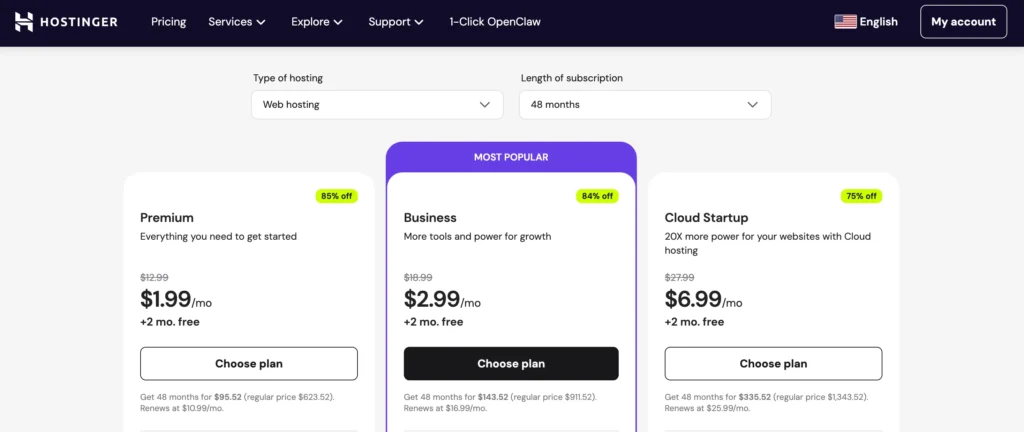
All three plans include a free domain for the first year, free SSL, free website migration, a malware scanner, and access to hPanel. The main differences come down to storage type, backup frequency, and performance headroom.
The renewal price jump is real and worth planning for. The Premium plan goes from $1.99/month to around $10.99/month – that is a significant increase. Always factor in the renewal cost when calculating your total year-two spend. This is standard across the hosting industry, but Hostinger’s jump is steeper than some competitors.
The Business plan is the sweet spot for most users. You get NVMe storage (faster than standard SSD), daily backups, a free CDN, and a WordPress staging environment – features that genuinely matter for growing sites.
WordPress Hosting
Hostinger’s WordPress hosting is priced identically to shared hosting – the same three tiers at the same price points. The difference is that these plans come pre-configured for WordPress, with one-click installation, a WordPress vulnerability scanner, and smart auto-updates. If you are building on WordPress, choose the WordPress hosting version of whichever tier you select.
VPS Hosting Pricing
| Plan | Intro Price (24-month) | CPU | RAM | Storage |
|---|---|---|---|---|
| KVM 1 | $5.99/month | 1 vCPU | 4 GB | 50 GB NVMe |
| KVM 2 | $7.99/month | 2 vCPU | 8 GB | 100 GB NVMe |
| KVM 4 | $12.99/month | 4 vCPU | 16 GB | 200 GB NVMe |
| KVM 8 | $25.99/month | 8 vCPU | 32 GB | 400 GB NVMe |
VPS plans are available on 12 or 24-month terms only. Renewal price increases are notably more reasonable here – roughly doubling rather than the 200-300% jump seen on shared plans.
hPanel: Hostinger’s Custom Dashboard
Most hosting providers give you cPanel. Hostinger built their own – called hPanel – and it genuinely better for beginners.
Everything is in one place: domains, SSL management, WordPress tools, backups, email setup, security settings, and analytics. The layout is clean, navigation is intuitive, and common tasks like installing WordPress or generating a staging site take less than two minutes.
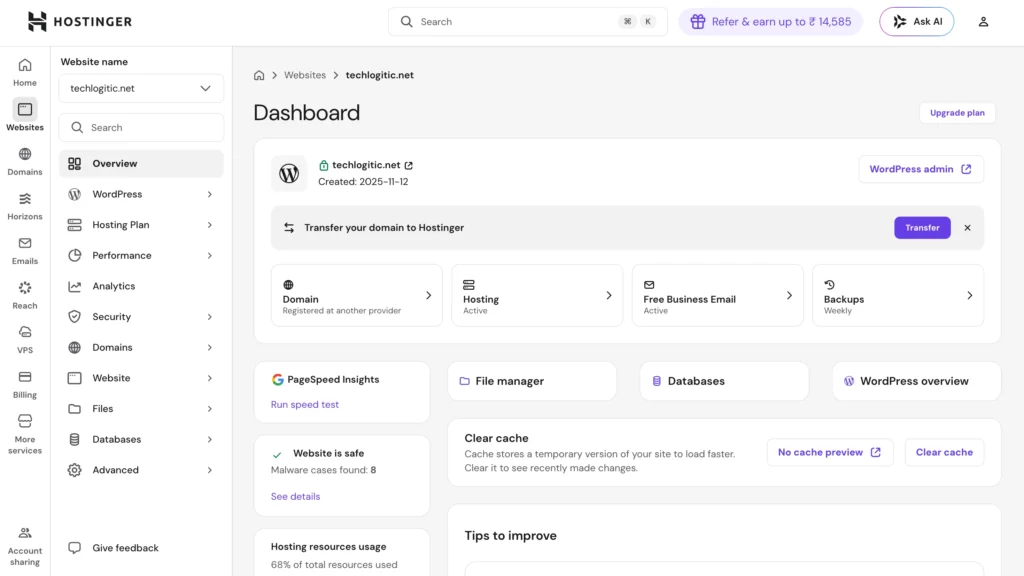
The one honest criticism is that hPanel can occasionally lag or load slowly during peak times. It is not a dealbreaker, but it happens enough to be worth mentioning. For the vast majority of daily tasks, the experience is smooth.
Performance and Speed
Hostinger uses LiteSpeed web servers with NVMe SSD storage on Business and higher plans. In practice, this combination produces fast load times for most site types.
Independent testing from December 2025 showed Hostinger achieving 100% uptime with a server response time of around 246ms – strong results for a provider at this price point. Over a 5-year monitoring window, Hostinger recorded 99.980% uptime from 2021 to 2026.
For techlogitic.net specifically, page performance has been consistent. With over 2,000 articles and steady traffic, we have not experienced downtime-related issues during our time on Hostinger.
A few performance notes worth knowing:
- Business and Cloud plans: NVMe storage gives a meaningful speed advantage over the Premium plan’s standard SSD.
- CDN: Available free from the Business plan onwards – important if your audience is geographically spread out.
- Shared hosting limits: On heavily trafficked days or resource-intensive setups, shared plans can slow under pressure. This is a shared hosting reality, not unique to Hostinger.
My performance scores (based on testing techlogitic.net):
- Speed: 4.3/5
- Uptime: 4.7/5
- Server response: 4.2/5
WordPress Hosting – How Good Is It?
WordPress is the main reason most people land on Hostinger, and it delivers well here. Hostinger walks users through every step from the moment they sign up, covering everything including transferring an existing website and installing WordPress.
Key WordPress features on Hostinger:
- One-click WordPress installation
- WordPress vulnerability scanner
- Auto-updates (smart – only applies compatible updates)
- WordPress staging environment (Business plan and above)
- LiteSpeed caching built in
- Free CDN (Business plan and above)
- WooCommerce compatible on all plans
The staging environment is worth highlighting. Being able to test changes on a clone of your live site before pushing them is valuable for anyone managing a content-heavy or e-commerce site. On Hostinger, setting up a staging site is a two-click process inside hPanel.
If you want to compare Hostinger against other options for your website, our guide to the best web hosting for small business covers the top providers side by side with pricing and use-case breakdowns.
VPS Hosting: Better Than Most Expect
Hostinger’s VPS offering is where they punch above their weight – especially for users new to server management.
Most VPS providers hand you a bare server and expect you to figure out the rest. Hostinger guides you through OS selection, control panel installation, and even lets you spin up pre-configured application templates. If your goal is deploying Docker containers, running n8n workflows, or hosting a web app outside of the WordPress ecosystem, the template system saves significant time.
The reasons to choose VPS over shared hosting are straightforward – dedicated CPU and RAM, full root access, and no resource-sharing with other sites on the same server. For a deeper look at when that upgrade makes sense, check out our article on 5 main reasons to choose VPS hosting.
My VPS score: 4.5/5 – the beginner-friendly setup process is a genuine differentiator here.
Hostinger Website Builder
Hostinger includes access to their drag-and-drop website builder on all plans. The builder uses a grid-based layout system – similar in concept to Squarespace – and you can start from a template, a blank canvas, or an AI prompt.
The AI builder is genuinely useful if you provide a detailed prompt. Basic sites can go from nothing to live in under 15 minutes. For simple business pages, portfolios, and landing pages, the builder does the job well and saves you the learning curve of WordPress.
For e-commerce, use WordPress with WooCommerce instead. The builder’s e-commerce features are limited compared to WooCommerce, and scaling becomes difficult. For non-e-commerce sites, the builder is a solid choice.
Hostinger Horizons is their newer AI-powered no-code app builder. It has improved since launch but is still experimental – edits can sometimes trigger larger rebuilds than expected. Treat it as a bonus tool for prototyping rather than a primary build environment.
Security Features
All Hostinger plans include:
- Free unlimited SSL certificates
- DDoS protection
- Malware scanner
- Weekly backups (Premium plan) / Daily backups (Business and Cloud Startup)
- Two-factor authentication on hPanel
The DDoS protection and malware scanning are entry-level by enterprise standards, but they cover the bases for most sites. Daily backups from the Business plan up are a meaningful safety net – losing a week of content because you were on the Premium plan’s weekly backup schedule is an avoidable risk.
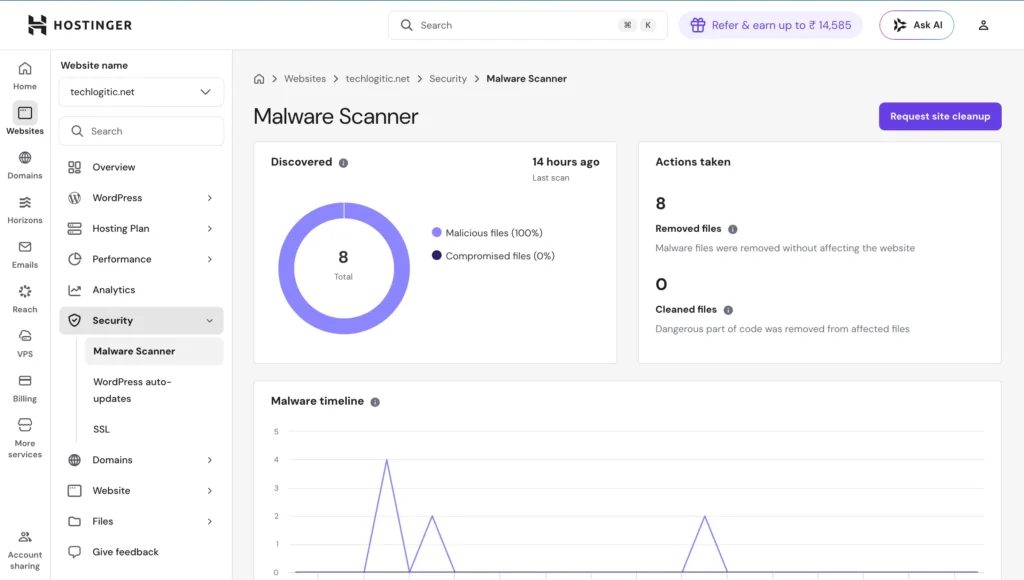
Keeping WordPress secure is more than just hosting-level protection. Pairing Hostinger’s built-in security with good plugin hygiene goes a long way – our guide to keeping your WordPress site secure covers the plugin and settings side of the equation.
Customer Support
Hostinger’s support runs 24/7 through live chat. The starting point is Kodee, their AI assistant, which handles common questions. For anything more complex, it transfers you to a human agent – usually within a few minutes.
In testing, Hostinger’s support provided clear answers and walked users through solutions with annotated screenshots showing exactly where to click. Crazy Egg That matches our experience at techlogitic.net – responses are generally helpful and specific, not generic copy-paste replies.
What is missing: Phone support. Hostinger has no phone line. If you are the type of user who needs to talk someone through a problem verbally, this is a genuine gap. Live chat is the only real-time option.
My support score: 4.1/5
Domain Registration and Business Email
Domains
You can register domains directly through Hostinger, with pricing starting around $0.99/year for promotional first-year rates on .com (renewing at standard rates after). If you are buying hosting anyway, the free domain included with annual plans on Business and Cloud Startup tiers is the simplest path.
For a standalone domain purchase, it is worth comparing prices – Namecheap and Cloudflare Registrar can be cheaper on renewal. Hostinger’s convenience factor is real if everything lives under one account, but it is not automatically the lowest-cost option for domains alone. Here is a useful guide on 8 things to consider when buying a domain name before you commit.
Business Email
Hostinger’s business email plans start at $0.35/month per mailbox on a 2-year term. You get a professional address at your domain, accessible via webmail or connectable to Gmail, Outlook, or Apple Mail.
If you want the full Google ecosystem – Drive, Calendar, Meet, shared Docs – Google Workspace is worth the premium. If you just need a professional inbox, Hostinger’s email option is perfectly capable and significantly cheaper.
Refund Policy
Hostinger maintains a 30-day money-back guarantee across most hosting products. Domains fall outside this – the refund window on domain registrations is much shorter (typically 4 days). Cryptocurrency payments are also non-refundable.
The refund process itself is simple: navigate to billing history in hPanel, request a refund on an eligible invoice, answer one question, and select your payment method. It is one of the easier refund flows in the hosting industry.
Hostinger Pros and Cons
| Pros | Cons |
|---|---|
| Very competitive entry pricing | Renewal prices jump significantly (especially on shared plans) |
| LiteSpeed servers with NVMe storage | No phone support |
| hPanel is cleaner than cPanel | No dedicated server options |
| Free SSL, domain, CDN (Business+) | Shared hosting can slow under heavy load |
| Beginner-friendly VPS setup | Resource limits not always clearly shown upfront |
| 30-day money-back guarantee | Monthly plans are expensive relative to annual |
| 24/7 live chat support | hPanel occasionally loads slowly |
| Strong WordPress toolset |
Who Should Use Hostinger?
Hostinger is a strong fit for:
- Bloggers and content sites starting out or scaling up
- WordPress users who want a managed-feeling experience without managed hosting prices
- Small business owners who want everything – hosting, domain, email – under one account
- Developers who want beginner-friendly VPS access with pre-built app templates
- Anyone running multiple sites on a budget
Hostinger is not the right call if:
- You need dedicated server infrastructure
- You need phone support
- You are running a very high-traffic enterprise application that needs guaranteed resources at scale
If you are still comparing options before deciding, the best web hosting for small business guide covers how Hostinger stacks up against Bluehost, SiteGround, and others on the key decision factors.
Final Verdict
After running techlogitic.net on Hostinger through thousands of articles and consistent traffic, the honest verdict is this: Hostinger delivers what it promises at the price it charges.
The Business plan is the right starting point for most serious site owners. The $2.99/month promotional rate gives you NVMe storage, daily backups, a free CDN, and a staging environment – features that a lot of hosts charge significantly more for. The renewal price increase is the one thing to budget for carefully.
For VPS, Hostinger is one of the few providers where a non-technical user can actually get a server running without a manual or a developer. That matters for a large portion of their audience.
My overall rating: 4.4/5 – the value-to-feature ratio at the entry and mid-tier pricing is hard to beat in 2026.
Check the latest Hostinger plans and pricing – the promotional rates change frequently and are worth verifying before you commit.
Frequently Asked Questions
Is Hostinger a good hosting provider in 2026?
Yes – Hostinger is one of the better hosting providers at its price point. It offers LiteSpeed servers, NVMe SSD storage, a clean dashboard (hPanel), free SSL, and solid uptime. It works well for bloggers, small businesses, WordPress users, and developers who want affordable VPS hosting. The main limitations are the renewal price increase on shared plans and the absence of phone support.
What is the best Hostinger plan for a WordPress blog?
The Business plan is the best starting point for most WordPress bloggers. At $2.99/month on a 48-month term, you get NVMe storage, daily backups, a free CDN, and a WordPress staging environment. The Premium plan works for very new blogs with low traffic, but the Business plan’s daily backups alone make it worth the extra dollar per month.
Does Hostinger’s price go up after the first term?
Yes. Hostinger’s introductory pricing only applies to the initial subscription period. On the Business plan, for example, you might pay $2.99/month to start and renew closer to $11.99/month. This is common across the hosting industry, but Hostinger’s jump is steeper than some competitors. The way to minimize this is to commit to the longest available billing term upfront.
Does Hostinger offer a money-back guarantee?
Yes – Hostinger offers a 30-day money-back guarantee on most hosting products. Domain purchases are not covered by this guarantee and have a separate, much shorter refund window (typically 4 days). Payments made via cryptocurrency are also non-refundable.